


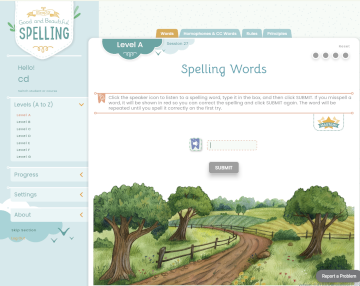
Simply Good and Beautiful Spelling is a free app for learning spelling for grades four through eight. It can be accessed through The Good and the Beautiful app that includes other language arts components, although you can use only the spelling app as a complete spelling program. The Good and the Beautiful language arts courses direct students when they are to use the app, but students work on words that are at their level rather than words prescribed for a course or grade level. Under “About” on the left navigation is a placement test that begins at a fourth-grade level. There are tests for each level to be administered by parents while students write on paper. Guidelines suggest which level to use based on the score.
The program divides lessons into levels A through Z, with at least eight sessions per level and four parts per session. The number of sessions depends on the student’s spelling accuracy. A session isn’t necessarily completed in one sitting, and more than one might be completed in one.
The program adapts to the student. Words that are missed are presented three more times in their level and five more times in future levels. Brief video instruction is interspersed between online exercises. The program adds sessions as needed, including repeating instruction on concepts students might not have grasped.
Each level (A through Z) teaches 32 new words. Included are more than 800 of the most commonly used words, homophones, commonly confused pairs (e.g., higher and hire), words with suffixes and prefixes, and plurals.
At all levels, basic spelling rules are taught and applied, and students learn spelling principles such as segmenting words that have prefixes or suffixes to aid in correct spelling. All levels present words to students by pronouncing them and using them in sample sentences; students type the words and submit them for checking. Students are not given a preview of the words in these exercises. In lower- to mid-level sessions, students also have exercises for homonyms where they move sentences with a missing word onto an image showing the correct homonym to fill the blank. They are shown the words and taught how they differ before doing these exercises. Exercises typically have five "questions," so they are briefer than other online spelling programs I've reviewed. I think most students will appreciate these bite-sized lessons.
At upper levels, students are sometimes asked to type in four words on a screen following prompts, rather than just one. Also, the homonym exercises present brief instruction on a pair of homonyms, then show one sentence at a time that is missing one of the two words; students type in the missing word from memory. Upper-level students also have exercises where they segment sounds within words.
If students make an error, the correct spelling is shown, and they must answer correctly before moving on. Sometimes, after a correct answer is submitted, the program uses images to show progress, such as a shelf with a book added for each correct word or a jeep moving along a trail. Images and colorful graphics are used throughout the program.
At the end of each session, any words missed are shown and should be written in either the optional Simply Spelling workbook (described below) or a notebook with lined paper.
Both instruction and exercises are brief. In one sitting, students can complete as many parts of a session as they wish or even more than one session. Students who miss several words will be presented with extra sessions. This adaptation keeps good spellers moving ahead while providing weaker spellers the extra practice they need.
Simply Spelling Workbooks
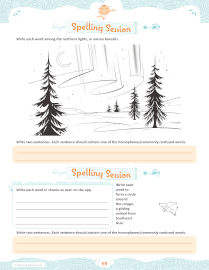 Three optional Simply Spelling Workbooks provide handwriting practice with spelling words in unusual formats. Any of the three workbooks can be used for any level, although the publisher recommends starting with the first two: Simply Spelling: Sky-High Adventures and Simply Spelling: Gadgets and Games. The third workbook is Simply Spelling: Ocean Adventures. All three are very similar in the types of exercises, so it doesn’t matter much which you choose.
These 70-page workbooks are available in print or as PDFs. There’s no problem purchasing one PDF workbook and using it along with all levels, but the themes and activities across the three workbooks add variety.
The workbooks do not provide lists of words. Instead, words missed in the spelling app, or words a parent assigns, are used in the student’s or parent’s choice of exercise pages. Exercises always have these assignments: “Write two sentences. Each sentence should contain one of the homophones/commonly confused words,” and “Write each word in chunks as seen on the app.” In addition, other exercises usually include one that tells students to write the words within an image, such as on the rays of the sun or within a bird nest. (Some of these require tiny writing!)
These are not typical spelling exercises, so parents have to determine how useful they are. Practicing writing words and sentences containing those words on lined paper is less interesting but should suffice.
Summary
The free Simply Good and Beautiful Spelling app is excellent. It does the teaching for busy parents, adapting to the student’s level, and the online practice exercises replace traditional spelling books. However, parents need to decide how to have students practice manually writing the words and need to be involved for that part of the course, even if they use the Simply Spelling Workbooks.